
Value Added Tax is a consumption tax added through the supply chain, and reverse VAT removes the VAT portion from a VAT-inclusive gross price. The reverse formula divides the gross amount by 1 plus the VAT rate as a decimal, then subtracts the net price to find included VAT. VAT reversal depends on rate type, invoice wording, taxable base, zero-rated goods, exemptions, discounts, shipping, and rounding.
This page explains VAT as a reverse tax entity, how the formula works, how VAT differs from sales tax and GST, and why official country-specific sources are required before relying on a VAT rate or category.
What Is VAT?
VAT means Value Added Tax. It is a consumption tax charged on many goods and services in VAT systems. Businesses may collect VAT on sales and may have rules for input VAT recovery, but those rules vary by country.
For reverse tax, VAT is the included tax inside a VAT-inclusive gross price. The calculation separates the gross price into net price and VAT amount.
How Do You Reverse VAT?
Use this formula:
Net price = VAT-inclusive gross price / (1 + VAT rate)
Then:
VAT amount = Gross price - Net price
Example: GBP 120.00 including 20% VAT reverses to GBP 100.00 net price and GBP 20.00 VAT.
The rate must match the country and VAT category. A 20% example is useful for UK standard-rate VAT, but it should not be copied into reduced-rate, zero-rate, exempt, or non-UK transactions. When the invoice already shows the VAT amount, use the shown amount as stronger evidence.
Why VAT Uses Division
VAT uses division because the VAT-inclusive gross price is the net price multiplied by 1 plus the VAT rate. Reversing the price means undoing that multiplication.
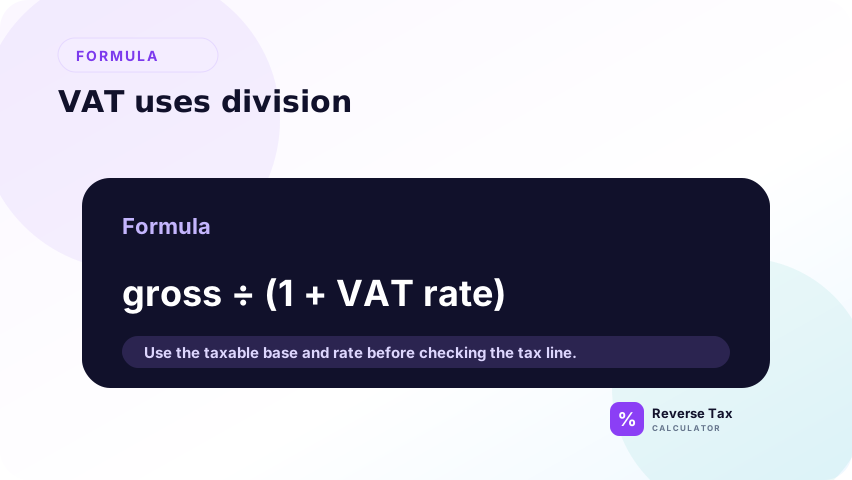
Subtracting 20% from a VAT-inclusive price gives the wrong answer because it removes 20% of the gross price, not the VAT calculated on the net price. This is the same arithmetic issue explained in the divide vs subtract guide.
VAT Entity Map
| Entity | Attribute | Reverse tax role |
|---|---|---|
| VAT | Tax type | Consumption tax |
| Gross price | Input | Price including VAT |
| VAT rate | Attribute | Rate used in divisor |
| Net price | Output | Price before VAT |
| VAT amount | Output | Included tax portion |
This map keeps the invoice terms clear, especially when a document uses gross and net labels.
VAT vs Sales Tax
VAT and sales tax are both consumption taxes, but the systems are different. VAT is generally collected through a multi-stage system, while U.S.-style sales tax is often charged at retail sale.
The reverse formula can look similar when the price already includes tax. The legal treatment, invoice rules, exemptions, and recovery rules are not the same. The sales tax vs VAT page explains the broader comparison.
VAT vs GST
VAT and GST are closely related consumption tax concepts. Some countries use the term VAT, while others use GST. The reverse formula is often the same when a price already includes the tax.
The name matters because official rates, invoice rules, filing rules, and tax categories are country-specific. A UK VAT rate should not be copied into a New Zealand GST calculation.
VAT-Inclusive vs VAT-Exclusive Price
VAT-inclusive price already contains VAT. VAT-exclusive price does not contain VAT yet. Reverse VAT applies only to VAT-inclusive gross prices.
If a price is VAT-exclusive, add VAT forward by multiplying by 1 plus the VAT rate. If a price is VAT-inclusive, divide by 1 plus the VAT rate to find the net price.
This direction check should happen before any spreadsheet formula is applied. A file that mixes VAT-inclusive consumer prices and VAT-exclusive business invoice lines needs a price_type column. Without that label, the same formula may be copied into rows that need opposite calculation directions.
VAT Rate Categories
VAT systems can include standard rates, reduced rates, zero rates, exempt supplies, and outside-scope items. These categories are not interchangeable.

For example, GOV.UK lists the UK standard VAT rate as 20%, with reduced and zero-rate categories also existing. A calculator needs the correct rate and category assumption before the formula is useful.
A zero-rated item and an exempt item can both display no VAT amount, but they may have different compliance meanings. A reverse VAT page should not collapse those categories into one generic “no tax” answer. The formula handles arithmetic only after the correct category is known.
How to Use VAT in Spreadsheets
Use columns such as gross_price, vat_rate, net_price, vat_amount, vat_category, and source_invoice.

If gross price is in A2 and VAT rate is in B2:
=A2/(1+B2)
VAT amount:
=A2-(A2/(1+B2))
The category column matters because reduced, zero-rated, exempt, and standard-rate items should not be treated as one group.
For invoice exports, add a rebuilt-total column and a category check. The rebuilt total confirms the arithmetic, while the category check confirms that a standard-rate formula was not applied to reduced-rate, zero-rate, exempt, or outside-scope rows.
VAT Decision Table
| Invoice shows | Best action |
|---|---|
| Gross price and VAT rate | Divide by 1 plus rate |
| Gross price and VAT amount | Subtract shown VAT amount |
| Net price and VAT rate | Add VAT forward |
| Multiple VAT rates | Split by rate |
| Exempt or zero-rated item | Do not force standard rate |
| Unknown country or category | Verify official source first |
This table supports calculation choices, not legal VAT classification.
What Mistakes Happen with VAT?
The common VAT mistakes are subtracting the VAT percentage, using the standard rate for reduced or zero-rated items, mixing multiple VAT rates in one formula, and copying a rate from one country into another country.
Another mistake is treating an invoice total as a clean VAT-inclusive gross price even when it includes non-tax adjustments, deposits, or out-of-scope charges.
These mistakes are especially risky in batch spreadsheets because each row can look mathematically valid. The safer workflow is to verify country, category, invoice line, rate, and price type before applying a formula. That sequence prevents the formula from hiding a classification error.
How to Check a VAT Reverse Calculation
After calculating net price, calculate VAT from the net price and add the two values back together. The rebuilt total should match the VAT-inclusive gross price except for rounding.
If it does not match, check the VAT rate, category, country, invoice line structure, rounding method, and whether the VAT amount was already shown separately.
If the VAT amount is shown on the invoice, compare your calculated VAT with the shown VAT before using the result. A difference may reflect rounding, mixed rates, invoice-level adjustments, or a wrong assumption about whether the gross price was VAT-inclusive.
Trust Boundary
VAT reverse calculation is arithmetic. It does not determine registration, place of supply, input VAT recovery, exemption status, zero-rating, filing treatment, or whether VAT should have been charged.
Use the relevant official tax authority and the original invoice for compliance-sensitive decisions.
This boundary matters because VAT can affect financial reporting and tax recovery. A calculator can split a gross price into net and VAT amounts, but it cannot decide whether the business can reclaim VAT, whether an item is exempt, or whether a cross-border supply uses a different rule.
Frequently Asked Questions
What does VAT mean?
VAT means Value Added Tax. It is a consumption tax used in many countries. In reverse VAT, the tax is removed from a VAT-inclusive gross price to find net price and VAT amount.
How do I reverse VAT?
Divide the VAT-inclusive gross price by 1 plus the VAT rate. For example, at 20%, divide by 1.20. The VAT amount is the gross price minus the net price.
Is VAT always 20%?
No. VAT rates and categories vary by country and product type. The UK standard rate is 20%, but reduced, zero-rate, exempt, and outside-scope categories can apply depending on the transaction.
Sources and Notes
- GOV.UK VAT rates
- Formula source: arithmetic relationship between gross price, net price, VAT rate, and VAT amount.