Tax-exclusive price is a price shown before tax, so tax is added after the base amount is known. A reverse tax formula is not needed when the price is already tax-exclusive because the net amount is visible and the tax can be added forward. Confusion happens when receipts mix tax-exclusive subtotals with tax-inclusive totals, discounts, shipping, fees, or VAT-style gross pricing. Receipt wording decides whether tax is included.
This page explains what tax-exclusive price means, how it differs from tax-inclusive price, how to calculate the final total, and how to avoid applying a reverse tax formula to a subtotal that already excludes tax.
What Is a Tax-Exclusive Price?
A tax-exclusive price is the before-tax price. If a product is listed at $100.00 before an 8% tax, the tax-exclusive price is $100.00 and the final price after tax is $108.00.
The key attribute is exclusion. Tax is not inside the price yet. That means the correct calculation direction is forward tax calculation, not reverse tax calculation.
This distinction prevents a common calculator error. A tax-exclusive price is already the base that tax will be calculated from. If you need the customer-facing total, add tax to it. If you need to remove included tax, first confirm that the source amount is actually tax-inclusive.
How Do You Calculate Tax from a Tax-Exclusive Price?
Use this formula:
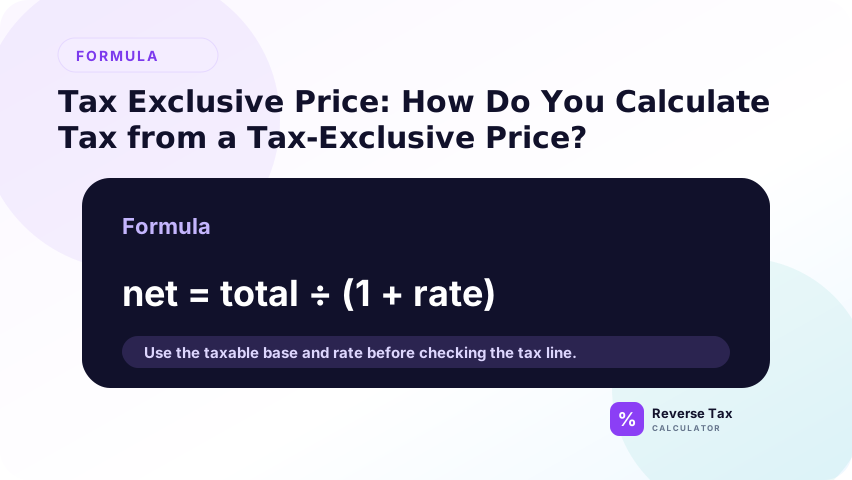
Tax amount = Tax-exclusive price * Tax rate
Then calculate the final total:
Final total = Tax-exclusive price * (1 + Tax rate)
Example: $100.00 at 8% produces $8.00 tax and a $108.00 total. If you already have this $100.00 subtotal, using the reverse tax formula would be the wrong operation.
The rate must be used as a decimal or percentage. An 8% rate is 0.08 in arithmetic, so the multiplier is 1.08. This relationship is the same as reverse tax, but the direction is opposite: tax-exclusive price moves forward to the final total.
Why Tax-Exclusive Price Should Not Be Reversed
A tax-exclusive price is already before tax. Reverse tax is designed for totals that already include tax. If you divide a tax-exclusive price by 1 plus the rate, you remove tax that was never included.
For example, $100.00 tax-exclusive at 8% should become $108.00 after tax. If you divide $100.00 by 1.08, you get $92.59, which is not the actual pre-tax price. It is a false value caused by using the wrong formula direction.
Tax-Exclusive vs Tax-Inclusive Price
Tax-exclusive and tax-inclusive prices answer opposite questions.
| Price type | Includes tax? | Correct action |
|---|---|---|
| Tax-exclusive price | No | Add tax forward |
| Tax-inclusive price | Yes | Remove tax by dividing |
If the document label says “subtotal,” “before tax,” or “excluding tax,” treat the amount as tax-exclusive unless another line says tax is already included.
Tax-Exclusive Price vs Pre-Tax Price
Tax-exclusive price and pre-tax price usually refer to the same amount. Both describe the price before tax is added. The difference is wording. “Tax-exclusive” focuses on what the price excludes, while “pre-tax” focuses on when the amount appears in the calculation order.
When a receipt already shows a pre-tax subtotal, use that number as direct evidence instead of recalculating it from the final total.
Where Do Tax-Exclusive Prices Appear?
Tax-exclusive prices commonly appear on U.S. retail shelf labels, quotes, invoices that state “tax not included,” B2B price lists, and receipts that show a subtotal before tax. In those cases, the displayed price is not the final tax-inclusive amount.
Many VAT and GST contexts are more likely to show tax-inclusive prices to consumers, but business invoices may still display net amounts and tax separately. The document label matters more than a broad country assumption.
How Tax-Exclusive Price Works on Receipts
On a receipt, tax-exclusive price may appear as subtotal, taxable sales, item total, or amount before tax. If the receipt gives this value and the tax amount separately, do not reverse the final total unless you are checking the receipt.
If the receipt has multiple tax groups, each group may have its own tax-exclusive base. A single subtotal may not explain the whole tax calculation.
How Tax-Exclusive Price Works on Invoices
Invoices often show a net amount, tax amount, and gross amount. The net amount is usually tax-exclusive. If the invoice already provides the tax-exclusive amount, that value should be used as the source of truth.
Reverse tax is useful only when the invoice gives a gross tax-inclusive amount without a clear net amount. When both are shown, use the invoice line and check whether it rebuilds correctly.
How to Calculate Tax-Exclusive Price in Spreadsheets
Use separate columns for tax_exclusive_price, tax_rate, tax_amount, and final_total. This makes the direction visible to anyone reviewing the sheet.
If tax-exclusive price is in A2 and tax rate is in B2:
=A2*(1+B2)
If you need only the tax amount:
=A2*B2
For audit-friendly spreadsheets, add a price_type column and mark the row as tax-exclusive. This prevents the same row from being picked up later by a reverse-tax formula intended for tax-inclusive totals. It also helps when a file contains both invoice subtotals and payment totals.
What Mistakes Happen with Tax-Exclusive Price?
The biggest mistake is reversing a price that already excludes tax. The second mistake is adding tax twice when the price was actually tax-inclusive. The third mistake is using the wrong rate, especially when a local combined rate is required.
The practical fix is to label the price type before calculating. A simple field that says tax-inclusive or tax-exclusive can prevent most formula-direction errors in spreadsheets and calculators.
How to Check a Tax-Exclusive Calculation
Start with the tax-exclusive price, multiply by the tax rate, and add the tax amount back to the price. The rebuilt final total should match the receipt or invoice total, except for rounding.
If it does not match, check whether the rate is correct, whether discounts were applied before tax, whether shipping is taxable, and whether the amount was actually tax-inclusive. For comparison, the tax-inclusive price page explains the opposite calculation.
Trust Boundary
Tax-exclusive price is a calculation label. It does not prove that the item is taxable, that the rate is correct, or that a filing or accounting treatment is required. It only identifies that the price does not include tax yet.
Use the original receipt, invoice, contract, and official tax authority guidance for compliance-sensitive decisions.
This boundary matters because tax-exclusive pricing can appear on quotes, invoices, order screens, and internal exports. The label tells you how the number behaves in a calculation, but it does not determine whether tax must be charged, what exemptions apply, or how the transaction should be reported.
Frequently Asked Questions
What does tax-exclusive price mean?
Tax-exclusive price means tax is not included yet. If an item is $100.00 before 8% tax, $100.00 is the tax-exclusive price. The final total after tax is $108.00.
Is tax-exclusive price the same as pre-tax price?
Usually yes. Both terms usually mean the price before tax. “Tax-exclusive” is common in invoices and pricing labels, while “pre-tax price” is common in consumer explanations and reverse tax examples.
Should I use reverse tax on a tax-exclusive price?
No. Reverse tax is for tax-inclusive totals. A tax-exclusive price should have tax added forward. Dividing a tax-exclusive amount by 1 plus the tax rate creates a false lower number.
Sources and Notes
- IRS Publication 583 recordkeeping guidance
- Formula source: arithmetic relationship between tax-exclusive price, tax rate, tax amount, and final total.