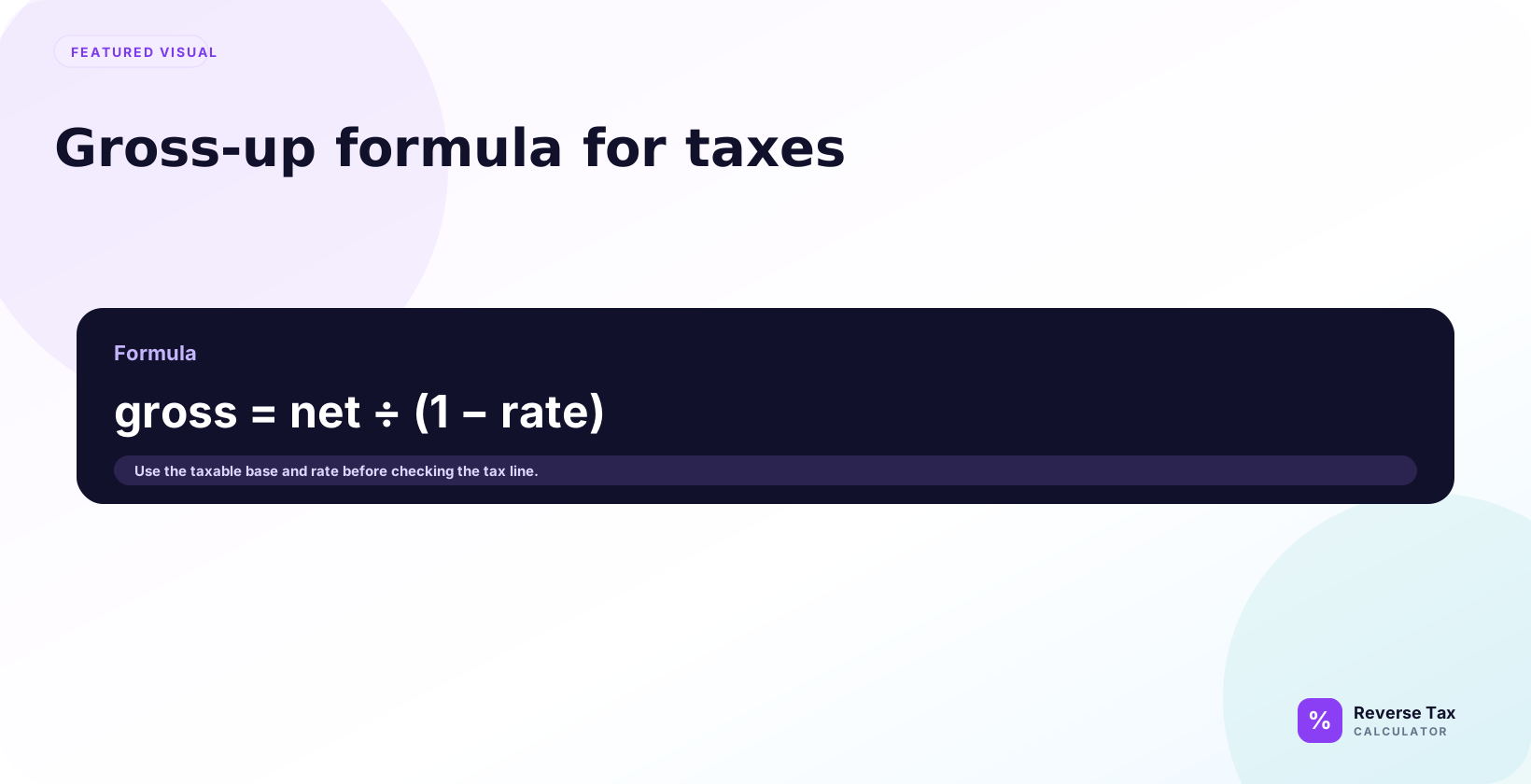
The gross-up formula for taxes converts a desired net amount into a required gross amount by dividing net pay by one minus the tax rate. For a 25% flat tax rate, a $750 net target requires $1,000 gross because $750 divided by 0.75 equals $1,000. The formula works for flat effective rates; progressive brackets, deductions, credits, payroll contributions, and local rules require layered calculation. The entered rate must represent the full effective tax burden.
Formula:
Gross payment = Desired net payment / (1 - tax rate)
What Is a Tax Gross-Up?
A tax gross-up is an added amount that covers tax so the recipient receives a target net payment.
| Term | Meaning |
|---|---|
| Desired net | Amount recipient should keep |
| Gross payment | Amount before tax |
| Tax gross-up | Extra gross amount added to cover tax |
| Tax rate | Assumed rate applied to gross payment |
Gross-ups are common for bonuses, relocation payments, reimbursements, executive compensation, and tax equalization arrangements.
Gross-Up Formula
Use:
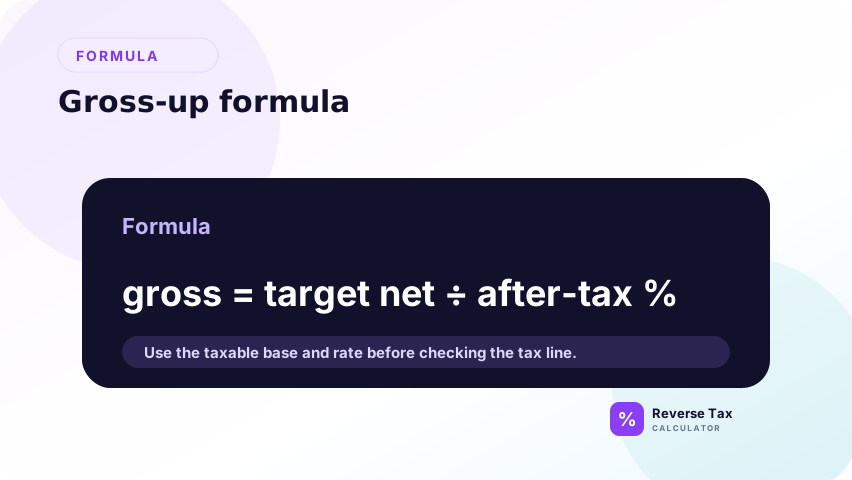
Gross payment = Net payment / (1 - tax rate)
The tax rate must be written as a decimal.
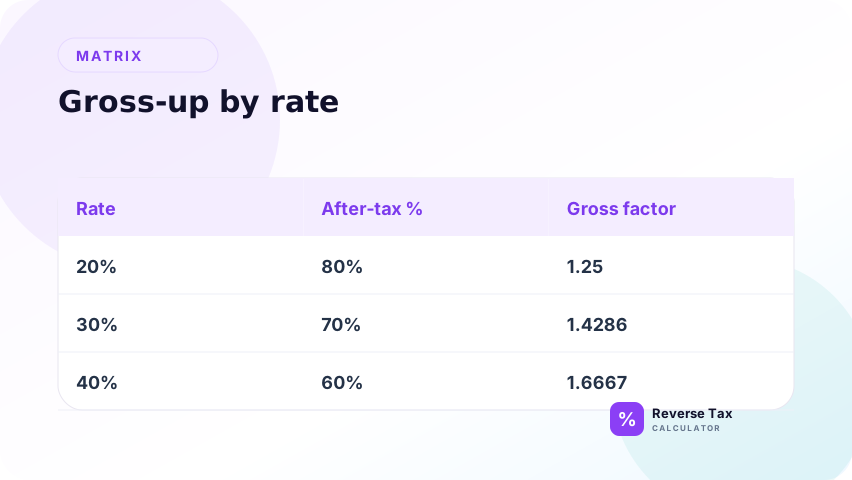
| Tax rate | Decimal | After-tax percentage |
|---|---|---|
| 10 percent | 0.10 | 0.90 |
| 20 percent | 0.20 | 0.80 |
| 30 percent | 0.30 | 0.70 |
| 40 percent | 0.40 | 0.60 |
Why the Formula Works
The recipient keeps only the after-tax percentage of the gross payment.
If the tax rate is 20 percent, the recipient keeps 80 percent.
Net = Gross x (1 - tax rate)
To solve for gross:
Gross = Net / (1 - tax rate)
This is the same inverse logic used in reverse calculations, but the direction is different from removing sales tax from a price.
Step-by-Step Gross-Up Calculation
A step-by-step gross-up calculation starts with the desired net amount, identifies the tax rate or withholding structure, calculates gross using the appropriate formula or iteration, then verifies that gross minus tax equals the target net. For flat-rate gross-up, divide net by 1 minus rate. For progressive tax, deductions, or contributions, use an iterative model.
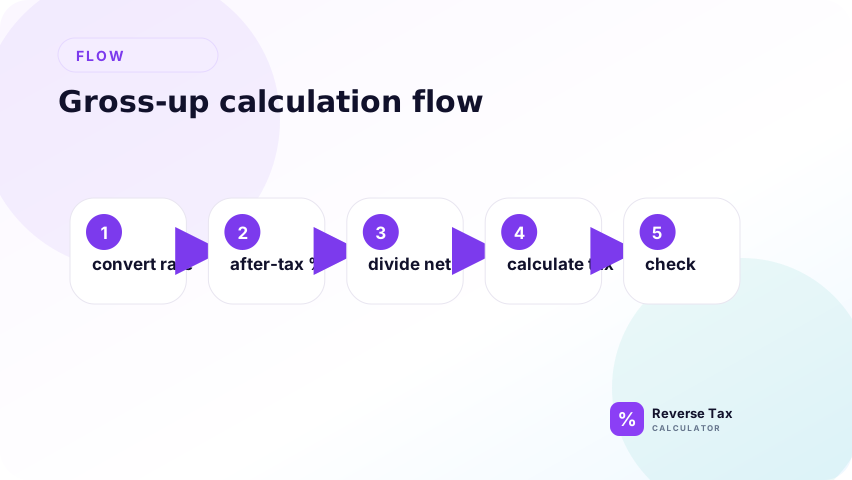
Use this section as the flat-rate teaching version of gross-up. It assumes one combined tax rate applies to the full gross payment and that no other deductions change the base. If the payment has progressive tax, pre-tax deductions, post-tax deductions, credits, or wage-base limits, this same sequence becomes an estimate and should be replaced by an iterative model.
Suppose the desired net payment is 1,000 and the tax rate is 20 percent.
Step 1: Convert the Tax Rate
Convert the tax rate into a decimal before using it in the gross-up formula. A gross-up formula is a mathematical model, so the rate must be expressed as the portion of gross pay withheld for tax. A 20 percent tax rate means 20 out of every 100 units of gross pay is withheld, which is written as 0.20 in the formula.
20 percent = 0.20
This step prevents the most common spreadsheet error. If you type 20 where the formula expects 0.20, the calculation treats the rate as 2000 percent instead of 20 percent. If the spreadsheet cell is formatted as a percentage, check whether it stores 20% as 0.20 behind the scenes.
Step 2: Find the After-Tax Percentage
Find the after-tax percentage by subtracting the tax rate from 1. The number 1 represents the full gross payment, or 100 percent. If 20 percent is withheld for tax, 80 percent remains as net pay. The gross-up formula needs this after-tax percentage because the target net amount is the part left after withholding.
1 - 0.20 = 0.80
This means the desired net payment represents 80 percent of the gross payment. In plain language, you are asking: "What gross amount leaves 1,000 after 20 percent is withheld?" That is why the next step divides by 0.80 instead of adding 20 percent to the net amount.
Step 3: Divide Net by After-Tax Percentage
Divide the desired net amount by the after-tax percentage. This solves for the gross amount that must exist before tax is withheld. If the net amount is 1,000 and that net amount represents 80 percent of gross, then gross must be 1,250.
1,000 / 0.80 = 1,250
This is the core gross-up step. It is different from adding tax to net. Adding 20 percent to 1,000 gives 1,200, but 20 percent tax on 1,200 is 240, leaving only 960 net. Dividing by the after-tax percentage solves the equation from the target net amount backward.
Step 4: Calculate Tax
Calculate the tax amount by subtracting the desired net payment from the grossed-up amount. The difference is the estimated tax that must be withheld so the recipient still receives the target net amount. In this example, the gross payment is 1,250 and the target net is 1,000, so the gross-up tax is 250.
1,250 - 1,000 = 250
You can also calculate tax as gross multiplied by the tax rate:
1,250 x 0.20 = 250
Both methods should agree in a simple flat-rate gross-up. If they do not, check whether the rate was entered as a decimal, whether rounding happened too early, or whether another deduction was included in the payment.
Step 5: Check
Check the result by calculating tax forward from the gross amount. This final check proves that the gross payment, tax amount, and target net payment reconcile. A gross-up calculation is not complete until gross minus tax equals the intended net amount.
1,250 x 20 percent = 250
1,250 - 250 = 1,000
The check also reveals whether the simple formula is appropriate. If the payment has progressive tax brackets, pre-tax deductions, post-tax deductions, credits, or percentage contributions, the flat-rate check may not be enough. In those cases, use an iterative gross-up method that recalculates tax and net pay until the target net amount is reached.
Example: Simple Bonus Gross-Up
An employer wants an employee to receive a 2,000 net bonus. The assumed tax rate is 25 percent.
Gross bonus:
2,000 / (1 - 0.25) = 2,666.67
Tax:
2,666.67 - 2,000 = 666.67
| Component | Amount |
|---|---|
| Desired net bonus | 2,000.00 |
| Assumed tax rate | 25 percent |
| Gross bonus | 2,666.67 |
| Tax amount | 666.67 |
Example: Multiple Tax Rates
If multiple flat taxes apply to the same gross payment, add the rates before applying the formula.
Suppose:
| Tax | Rate |
|---|---|
| Federal withholding assumption | 20 percent |
| State withholding assumption | 5 percent |
| Payroll tax assumption | 7.65 percent |
Combined rate:
20 + 5 + 7.65 = 32.65 percent
Gross-up:
1,000 / (1 - 0.3265) = 1,484.78
Estimated tax:
1,484.78 - 1,000 = 484.78
This works only if the rates apply to the same gross payment and are treated as flat percentages.
Example: Why Adding Tax to Net Is Wrong
Suppose the desired net payment is 1,000 and the tax rate is 20 percent.
Wrong method:
1,000 + 20 percent = 1,200
Tax on 1,200:
1,200 x 20 percent = 240
Net:
1,200 - 240 = 960
The recipient is 40 short.
Correct method:
1,000 / 0.80 = 1,250
Tax:
1,250 x 20 percent = 250
Net:
1,250 - 250 = 1,000
Example: Gross-Up with a Post-Tax Deduction
Suppose the recipient must receive 1,000 after tax and after a 50 post-tax deduction. The assumed tax rate is 20 percent.
First increase the after-tax target:
1,000 + 50 = 1,050
Gross-up:
1,050 / 0.80 = 1,312.50
Tax:
1,312.50 x 20 percent = 262.50
After tax:
1,312.50 - 262.50 = 1,050
After deduction:
1,050 - 50 = 1,000
This is why deductions must be classified before grossing up.
Gross-Up vs Reverse Tax
Gross-up and reverse tax both work backward, but they answer different questions.
| Feature | Gross-up | Reverse tax |
|---|---|---|
| Starting value | Desired net payment | Tax-inclusive total |
| Goal | Find gross payment | Find pre-tax price |
| Formula | Net / after-tax percentage | Total / tax multiplier |
| Common use | Payroll and bonuses | Receipts and invoices |
| Main risk | Payroll rules | Rate and taxability |
Gross-Up Formula Table by Rate
| Desired net | Tax rate | Divide by | Gross payment | Tax |
|---|---|---|---|---|
| 1,000 | 10 percent | 0.90 | 1,111.11 | 111.11 |
| 1,000 | 20 percent | 0.80 | 1,250.00 | 250.00 |
| 1,000 | 30 percent | 0.70 | 1,428.57 | 428.57 |
| 1,000 | 40 percent | 0.60 | 1,666.67 | 666.67 |
The higher the tax rate, the more gross pay is needed to deliver the same net amount.
When to Use Gross-Up
Use gross-up when the recipient needs to keep a target net amount.
| Situation | Gross-up fit |
|---|---|
| Net bonus target | Yes |
| Relocation payment | Often |
| Employer-paid tax assistance | Often |
| Sales tax receipt | No |
| VAT-inclusive invoice | No |
| Regular salary planning | Maybe |
Why Real Payroll Gross-Up May Need Iteration
Real payroll may use progressive withholding, pay-period rules, pre-tax deductions, post-tax deductions, taxable benefits, and location-specific taxes.
The simple gross-up formula is best for flat-rate examples. Payroll systems may need iteration:
- Guess gross payment.
- Calculate withholding and deductions.
- Compare net pay to target.
- Adjust gross amount.
- Repeat until close.
IRS Publication 15-T provides federal income tax withholding methods for 2026. That is a reminder that real withholding can require official tables and method rules, not just a single formula.
What Inputs Make a Gross-Up Reliable?
| Input | Why it matters |
|---|---|
| Desired net amount | Target output |
| Tax rate or withholding method | Controls gross amount |
| Pay frequency | Affects withholding |
| Filing status | Affects federal withholding |
| State and local taxes | Add tax layers |
| Pre-tax deductions | Change taxable base |
| Post-tax deductions | Change final net |
| Supplemental wage treatment | May affect bonuses |
Without these inputs, a gross-up is only an estimate.
What If the Gross-Up Is for Relocation?
Relocation gross-ups often involve reimbursements, taxable benefits, moving expenses, and employer policy. The flat formula can show the concept, but the payroll treatment depends on the payment type.
Example with a 5,000 desired net relocation payment and 30 percent assumed tax rate:
5,000 / 0.70 = 7,142.86
Estimated tax:
7,142.86 - 5,000 = 2,142.86
| Component | Amount |
|---|---|
| Desired net relocation amount | 5,000.00 |
| Assumed tax rate | 30 percent |
| Gross payment | 7,142.86 |
| Estimated tax | 2,142.86 |
What If the Gross-Up Is for a Reimbursement?
Some reimbursements may be taxable and some may not be taxable depending on the rule and employer policy. If the reimbursement is not taxable, a gross-up may not be needed.
| Reimbursement status | Gross-up need |
|---|---|
| Taxable reimbursement | May need gross-up |
| Non-taxable reimbursement | Usually no gross-up |
| Mixed reimbursement | Split first |
| Unknown treatment | Verify before calculating |
This is a tax-treatment question before it is a math question.
Decision Matrix
| Situation | Use |
|---|---|
| One flat tax rate | Simple gross-up formula |
| Several flat rates on same base | Add rates, then gross up |
| Progressive withholding | Iterative payroll method |
| Bonus payroll | Payroll-specific gross-up |
| Sales tax included in price | Reverse tax formula |
| Exact U.S. withholding | IRS estimator or payroll system |
What a Gross-Up Calculation Can and Cannot Prove
| Can estimate | Cannot prove |
|---|---|
| Gross amount under assumed tax rate | Exact final tax liability |
| Tax cost of a net payment | Correct payroll withholding |
| Flat-rate bonus gross-up | W-4 accuracy |
| Sensitivity to tax rate | Employer compliance |
Gross-up math is useful, but payroll accuracy depends on current rules and employee-specific inputs.
Common Mistakes
Common gross-up mistakes include using the tax-inclusive reverse formula instead of the gross-up formula, using one flat rate for progressive taxes, ignoring employer or payroll contributions, ignoring pre-tax and post-tax deductions, and mixing pay periods. The formula should match the tax system and the definition of net pay.
The safest correction is to define the target net amount and the deductions before calculating gross. A bonus gross-up, salary gross-up, payroll gross-up, and sales-tax gross-up can use different formulas. If the tax system is progressive or includes contributions, a flat-rate shortcut may be only a rough estimate.
Multiplying Net by the Tax Rate
If the net target is 1,000 and tax is 20 percent, adding 200 is not enough. A 1,200 gross payment taxed at 20 percent leaves 960.
Dividing by the Tax Rate
Divide by the after-tax percentage, not the tax rate.
Ignoring Multiple Taxes
Federal, state, local, payroll, and benefit deductions may all affect net pay.
Treating Withholding as Final Tax
Withholding and final tax liability can differ.
Using Gross-Up for Sales Tax
Sales tax reverse calculations use a different formula.
Ignoring Progressive Tax Brackets
If the payment crosses brackets or changes withholding behavior, a flat-rate formula can miss the true gross amount.
Entity Map for Gross-Up
| Entity | Role |
|---|---|
| Desired net | Amount recipient should keep |
| Gross payment | Amount paid before tax |
| Tax rate | Percentage withheld or assumed |
| After-tax percentage | Denominator in the formula |
| Tax amount | Difference between gross and net |
| Deduction | May change net or taxable amount |
| Payroll method | Determines real withholding |
Gross-Up Audit Checklist
Before finalizing a gross-up, check:
| Check | Why it matters |
|---|---|
| Desired net confirmed | Prevents wrong target |
| Taxable status confirmed | Determines whether gross-up is needed |
| Rate assumption documented | Explains the result |
| Deductions classified | Changes net amount |
| Payroll method checked | Avoids formula-only error |
| Source retained | Supports review |
What This Page Does Not Cover
| Topic | Better page |
|---|---|
| Net-to-gross salary | How to Calculate Gross Salary from Net Pay |
| Reverse income tax overview | What Is a Reverse Income Tax Calculator? |
| Reverse payroll tax | Reverse Payroll Tax Calculation |
| Reverse sales tax formula | Reverse Tax Formula |
Frequently Asked Questions
What is the gross-up formula?
The formula is gross payment = net payment / (1 - tax rate).
How do I gross up 1,000 at 20 percent tax?
Divide 1,000 by 0.80. The gross payment is 1,250.
Why not just add 20 percent to the net amount?
Because tax applies to the gross payment, not the net target. Adding 20 percent would leave the recipient short.
Can I add multiple tax rates together?
Only when the rates apply to the same gross payment as flat percentages. Otherwise, use a payroll-specific method.
Is gross-up the same as reverse sales tax?
No. Gross-up finds a gross payment from a desired net payment. Reverse sales tax removes tax from a tax-inclusive price.
Sources
These sources support tax and withholding context, while the formulas on this page explain gross-up arithmetic. Use official tax authority and payroll guidance for real withholding, benefits, contribution, and filing decisions. Use this page to understand which gross-up model fits a flat-rate or more complex tax situation.