
Outdated tax rates cause reverse tax errors because the same tax-inclusive total produces a different net price when the multiplier changes. A calculator divides the total by one plus the rate, so even a small rate update can alter the before-tax amount and tax included. Rate accuracy depends on location, transaction date, product category, local surtaxes, temporary changes, and whether the receipt used the old or new rate.
This page explains why transaction date matters, how rate changes distort reverse calculations, how to diagnose outdated-rate errors, and how to build a safer spreadsheet workflow for historical receipts, refunds, POS exports, and bookkeeping cleanup.
What Is an Outdated Tax Rate?
An outdated tax rate is a rate that no longer matches the rate that applied to the transaction being calculated. The rate may be old because the law changed, the local jurisdiction changed, the product category changed, or a user copied a rate from the wrong year.
In reverse tax, the correct rate is the rate that applied when and where the transaction happened. Today's rate is not automatically correct for an older receipt.
How Does an Outdated Rate Change Reverse Tax?
Reverse tax divides the tax-inclusive total by 1 plus the rate. When the rate is outdated, the divisor is outdated too.
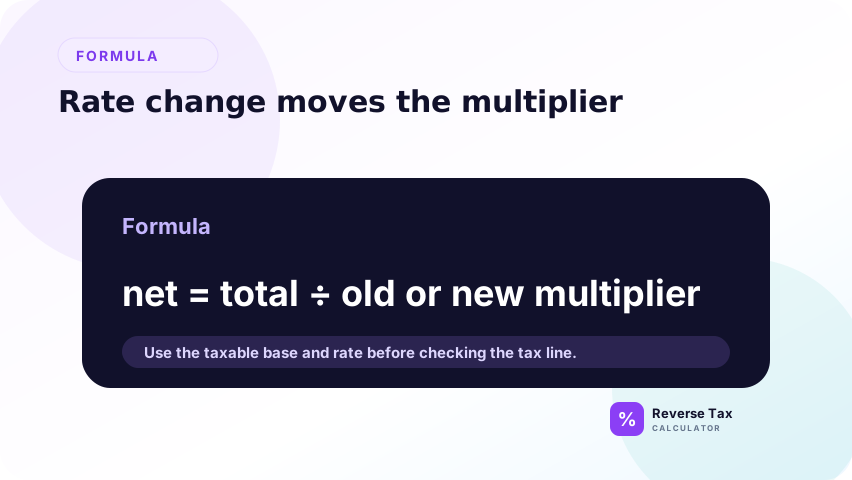
Example: a $108.25 total divided by 1.0825 gives $100.00. If someone uses 1.08 instead, the result is about $100.23. The difference may look small, but it affects the tax amount and can accumulate across many rows.
This is the same formula problem described in the wrong tax rate guide, but the cause is time-based. The user may have the right location and product category while still using the wrong year or effective date.
Why Transaction Date Matters
The transaction date tells you which rate schedule to verify. A receipt from 2022 should be checked against the rate that applied in 2022, not only the rate shown today on a general webpage.

This matters for refunds, audit support, historical bookkeeping cleanup, and old ecommerce exports. If the sale date and refund date differ, use the original sale details when splitting the refunded tax unless the refund document gives tax separately.
Why Location Matters with Outdated Rates
Location matters because combined rates can include state, county, city, district, or special local components. One locality can change while another stays the same. A current state rate may still miss historical local changes.

When a receipt gives a store address, ship-to address, or place-of-supply detail, preserve that information. It may explain why two receipts from the same state used different combined rates. The guide to city, county, and ZIP sales tax rates explains why local evidence matters when state-level rates are not enough.
How Outdated Rates Affect Before-Tax Price
An outdated rate changes the calculated before-tax price. If the rate used is too low, the before-tax price is usually too high. If the rate used is too high, the before-tax price is usually too low.
| Tax-inclusive total | Correct rate | Rate used | Before-tax result |
|---|---|---|---|
| $108.25 | 8.25% | 8.25% | $100.00 |
| $108.25 | 8.25% | 8.00% | $100.23 |
| $108.25 | 8.25% | 9.00% | $99.31 |
The formula did not fail. The evidence input failed.
How Outdated Rates Affect Tax Amount
The tax amount is the total minus the before-tax price. If the before-tax price is wrong, the tax amount is also wrong. This can distort tax payable, refund amounts, revenue splits, and audit explanations.
For small receipts, the error may be only cents. For monthly exports, the error may become material enough to require review.
The practical risk is cumulative. A single old receipt might not matter, but a bulk spreadsheet that applies today's rate to thousands of historical rows can create a systematic error. That is why transaction-date rate evidence should be stored beside the formula.
How to Identify an Outdated Rate Problem
First, compare the assumed rate with the implied rate when subtotal and total are known. Second, check the transaction date and jurisdiction. Third, review whether the receipt contains mixed taxable items that could mimic a rate mismatch.
If the receipt shows the tax amount separately, use that amount as source evidence. A shown tax line can reduce reliance on historical rate lookup.
Outdated Rate Troubleshooting Table
| Symptom | Possible cause | Check |
|---|---|---|
| Old receipt does not match current rate | Rate changed after sale | Verify transaction-date rate |
| State rate is close but not exact | Local rate changed | Check city, county, district |
| Rate differs by item group | Taxability changed or mixed items | Split items by category |
| Refund tax seems wrong | Used refund-date rate | Match original sale |
| Export lacks location | Missing evidence | Reconcile against source order |
This table is a diagnostic aid, not a substitute for official rate records.
How to Handle Old Receipts
For old receipts, record the transaction date, location, source total, shown tax amount, and rate evidence. If the receipt shows tax separately, calculate the before-tax amount by subtraction.
If the receipt does not show tax separately, use an official or authoritative historical rate source where available. Do not assume the current rate applied to the old transaction.
If a source rate cannot be verified, label the result as an estimate. That is better than hiding uncertainty. A calculation note such as “historical rate not verified” tells future reviewers that the arithmetic was performed but the evidence is incomplete.
How to Handle Refunds with Old Rates
Refunds should usually be matched to the original sale. If the original sale used an older rate, the refund tax portion should be based on that original transaction unless the refund document gives a separate tax amount.
This avoids a common mistake where a refund is reversed at today's rate even though the customer is being refunded tax from an earlier purchase.
How to Build a Safer Spreadsheet
Use columns for transaction_date, jurisdiction, rate_source, rate_verified_date, tax_inclusive_total, rate_used, before_tax_amount, tax_amount, and variance.
The rate source column is essential. Without it, a reviewer cannot tell whether the rate came from the receipt, an official table, a current webpage, or a guess.
For high-volume exports, group rows by transaction date and jurisdiction before applying rates. This prevents a single copied formula from spreading across rows that belong to different periods or locations. It also makes rate updates easier to audit later.
What This Page Does Not Prove
This page explains how outdated rates affect arithmetic. It does not determine product taxability, legal rate history, exemption status, filing treatment, or whether a business charged tax correctly.
Use official tax authority records, source receipts, invoices, and accounting records for compliance-sensitive work.
It also does not provide a universal historical rate database. The correct source depends on the jurisdiction, tax type, transaction date, and product category. The page's role is to explain the error pattern and the evidence needed to fix it.
Trust Boundary
Outdated-rate analysis can identify a likely calculation problem, but it cannot replace official rate verification. A reverse tax formula can be correct while the historical rate assumption is wrong.
Use transaction-date evidence and official sources before relying on historical calculations for refunds, audits, or bookkeeping.
For compliance-sensitive use, preserve the original document and the rate source used for the calculation. A spreadsheet result without source evidence may be useful for internal review, but it should not be treated as verified historical tax support.
Frequently Asked Questions
Can I use today's rate for an old receipt?
No, not when historical accuracy matters. Use the rate that applied on the transaction date. Today's rate may differ from the rate used when the receipt was issued.
What if I cannot find the historical rate?
Use the shown tax amount if it appears on the receipt. If no tax amount or historical rate is available, mark the calculation as estimated and do not treat it as verified.
Why does an old receipt differ by more than one cent?
A difference larger than one cent often indicates a wrong rate, changed local rate, mixed taxable items, or a source total that includes non-tax items. Rounding alone usually explains only small differences.
Sources and Notes
- IRS Publication 583 recordkeeping guidance
- Formula source: arithmetic relationship between transaction-date rate, tax-inclusive total, before-tax amount, and tax amount.