
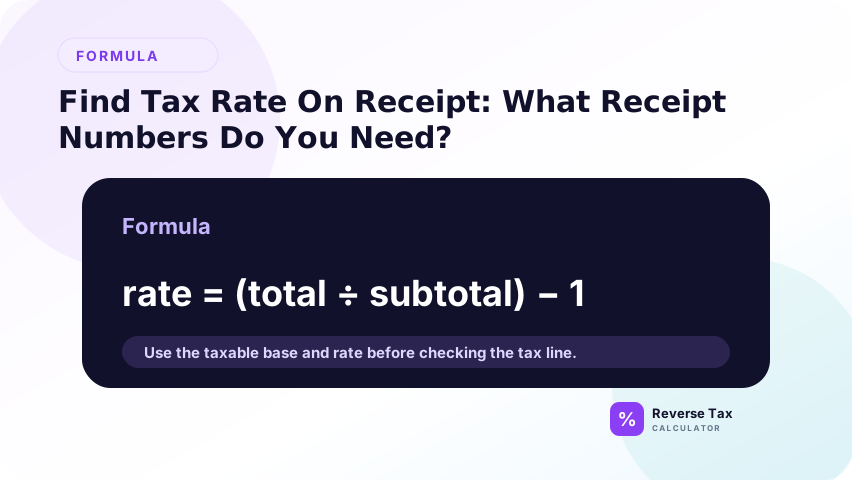
Finding the tax rate on a receipt starts by comparing the printed tax amount with the taxable subtotal, not the final total. The implied rate equals tax divided by taxable subtotal multiplied by 100, and that rate can be used to reverse a matching tax-inclusive amount. Receipts may hide the true rate when they include exempt items, discounts, multiple tax lines, rounded tax, shipping, tips, or local taxes.
Formula:
Tax rate = Tax amount / pre-tax subtotal x 100
What Receipt Numbers Do You Need?
You need two numbers:
| Needed number | Receipt label |
|---|---|
| Pre-tax taxable amount | Subtotal, taxable subtotal, net amount |
| Tax amount | Tax, sales tax, VAT, GST, HST |
Do not use the final total as the denominator when calculating the rate. The tax rate applies to the pre-tax amount, not the after-tax total.
Tax Rate Formula from Receipt
The tax rate formula from a receipt is tax amount divided by taxable subtotal. If the receipt shows subtotal, tax, and total, subtracting may not be needed because the tax line is already visible. The result is an implied rate, not always the official rate. Rounding, exempt items, discounts, local taxes, and fees can make the implied rate look unusual.
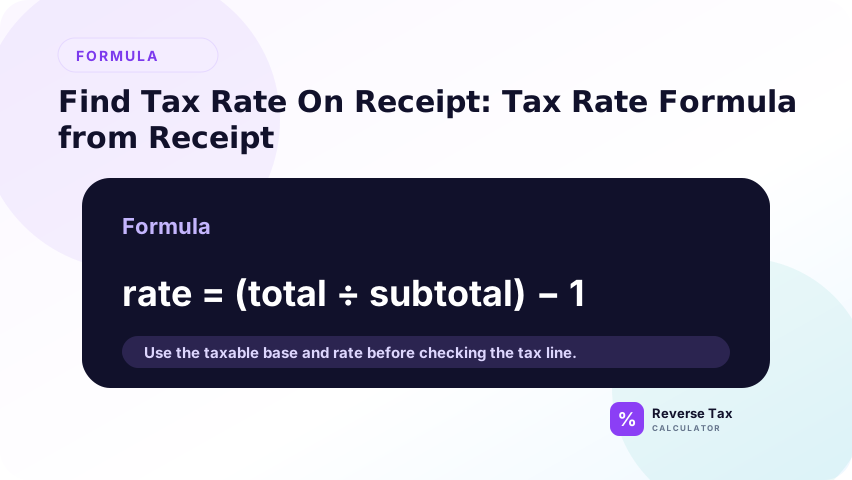
Use:
Tax rate = Tax / subtotal x 100
Example:
16.00 / 200.00 x 100 = 8 percent
The subtotal must be the taxable subtotal. If the subtotal includes exempt items, tips, non-taxable shipping, or credits, the implied rate may be misleading.
Example 1: Subtotal and Tax Are Shown
Suppose a receipt shows:

| Field | Amount |
|---|---|
| Subtotal | 100.00 |
| Sales tax | 8.00 |
| Total | 108.00 |
Calculation:
8.00 / 100.00 = 0.08
0.08 x 100 = 8 percent
The receipt tax rate is 8 percent.
Example 2: Total and Tax Are Shown
If the receipt shows total and tax, first subtract tax from total:
Subtotal = Total - tax
Suppose a receipt shows:
| Field | Amount |
|---|---|
| Tax | 8.00 |
| Total | 108.00 |
Subtotal:
108.00 - 8.00 = 100.00
Rate:
8.00 / 100.00 x 100 = 8 percent
Example 3: Mixed Items
Suppose a receipt shows:
| Field | Amount |
|---|---|
| Receipt subtotal | 150.00 |
| Tax | 8.00 |
| Total | 158.00 |
If only 100.00 of the subtotal was taxable and 50.00 was exempt, the rate is not:
8.00 / 150.00 x 100 = 5.33 percent
The correct taxable rate is:
8.00 / 100.00 x 100 = 8 percent
This is why receipt tax rate detection can fail when the subtotal includes exempt items.
Example 4: Receipt with Separate State and Local Tax
Suppose a receipt shows:
| Field | Amount |
|---|---|
| Taxable subtotal | 100.00 |
| State tax | 6.00 |
| Local tax | 2.00 |
| Total tax | 8.00 |
| Total | 108.00 |
State rate:
6.00 / 100.00 x 100 = 6 percent
Local rate:
2.00 / 100.00 x 100 = 2 percent
Combined rate:
8.00 / 100.00 x 100 = 8 percent
Use the combined rate if you are reversing the full tax-inclusive total.
Example 5: Receipt with a Tip
Suppose a restaurant receipt shows:
| Field | Amount |
|---|---|
| Food subtotal | 100.00 |
| Sales tax | 8.00 |
| Optional tip | 20.00 |
| Total paid | 128.00 |
The tax rate is:
8.00 / 100.00 x 100 = 8 percent
Do not calculate:
8.00 / 128.00 x 100 = 6.25 percent
The total paid includes the optional tip, so it is not the tax base.
Receipt Label Matrix
| Receipt label | Meaning | Use for rate formula? |
|---|---|---|
| Subtotal | May be before tax | Use only if fully taxable |
| Taxable subtotal | Amount subject to tax | Yes |
| Sales tax | Tax amount | Numerator |
| VAT | Tax amount | Numerator |
| GST or HST | Tax amount | Numerator |
| Total | After tax | Not denominator |
| Amount paid | Payment amount | Usually no |
| Balance due | After payments | Usually no |
| Tip | May be separate | Usually exclude if optional |
| Shipping | Depends | Verify taxability |
How to Find the Rate When Multiple Tax Lines Appear
Some receipts show state tax, local tax, district tax, or multiple taxes.
If all tax lines apply to the same taxable subtotal, add the tax amounts:
Total tax = State tax + local tax + district tax
Then:
Combined rate = Total tax / taxable subtotal x 100
Example:
| Tax line | Amount |
|---|---|
| State tax | 6.00 |
| Local tax | 2.00 |
| Total tax | 8.00 |
8.00 / 100.00 x 100 = 8 percent
If different tax lines apply to different bases, calculate each separately.
How to Find the Rate When the Receipt Shows Only Total
If the receipt shows only the final total and no tax amount, you cannot reliably calculate the tax rate from the receipt alone.
You need at least one of these:
| Missing information | How to fill the gap |
|---|---|
| Tax amount | Use receipt tax line or merchant record |
| Pre-tax subtotal | Subtract tax from total if tax is known |
| Official rate | Use location, date, and item type |
| Item taxability | Check whether items were taxable |
If you know the total and official rate, you can reverse tax. But that is different from discovering the rate from the receipt.
When the Receipt Rate Is Not Reliable
The implied receipt rate may look strange for valid reasons:
| Situation | Why rate looks wrong |
|---|---|
| Exempt items | Subtotal includes non-taxed items |
| Multiple rates | One tax amount covers several groups |
| Discounts | Taxable base changed before tax |
| Shipping | May be included or excluded |
| Tips | May be separate or mandatory |
| Rounding | One-cent differences can affect rate |
| Returns or credits | Total may not equal sale amount |
Rounding and Receipt Tax Rate
Rounding can make the calculated rate slightly different from the posted rate.
Example:
7.41 / 92.59 x 100 = 8.003 percent
That does not necessarily mean the rate is 8.003 percent. It may be an 8 percent rate with rounded cents.
When interpreting receipt rates, round the implied rate to a practical tax rate only after checking the receipt structure.
Rate Detection Decision Matrix
| Receipt information available | Can you find the rate? | Method |
|---|---|---|
| Subtotal and tax | Yes | Tax divided by subtotal |
| Total and tax | Yes | Subtract tax first |
| Total only | No | Need official rate or tax amount |
| Tax only | No | Need subtotal or total |
| Multiple tax lines | Yes, maybe | Add or separate lines |
| Mixed taxable and exempt items | Maybe | Need taxable subtotal |
| Tip included in total paid | Yes, if subtotal shown | Exclude optional tip |
How to Use the Receipt Rate for Reverse Tax
Once you identify the rate, use it only on the amount that includes that tax.
Example:
| Field | Amount |
|---|---|
| Tax-inclusive total | 108.00 |
| Receipt rate | 8 percent |
Reverse calculation:
108.00 / 1.08 = 100.00
108.00 - 100.00 = 8.00
The rate and total must match the same taxable base.
Common Mistakes
Common mistakes include dividing tax by total instead of subtotal, using balance due instead of receipt total, ignoring exempt items, treating the implied rate as official, and missing local tax components. The safest workflow is to identify taxable subtotal, tax amount, receipt date, location, and item mix before interpreting the rate.
The biggest mistake is forgetting that the receipt formula finds an implied rate from visible fields. It does not prove the official rate by itself. If the implied rate is strange, check whether the subtotal includes exempt items, whether tax was rounded, whether local taxes are included, and whether the amount due reflects payments or credits.
Dividing Tax by Total
Do not calculate rate as tax divided by after-tax total.
8.00 / 108.00 x 100 = 7.41 percent
That is the tax share of the final total, not the tax rate.
Using a Subtotal That Includes Exempt Items
If exempt items are in the subtotal, the implied rate will be too low.
Ignoring Multiple Tax Lines
State and local lines may need to be combined.
Treating Rounding as a New Rate
Small decimal differences often come from cent rounding.
Using Amount Paid
Amount paid can include tips, gift cards, credits, or partial payments.
What This Page Does Not Cover
| Topic | Better page |
|---|---|
| Choosing rate from official sources | How to Choose the Correct Tax Rate |
| State vs local combined rate | State Tax Rate vs Local Combined Rate |
| Receipt reverse tax example | Reverse Tax Example Using a Receipt |
| One-cent differences | Why Reverse Tax Results Differ by One Cent |
Frequently Asked Questions
How do I calculate sales tax rate from a receipt?
Divide the tax amount by the pre-tax taxable subtotal, then multiply by 100.
Do I divide tax by total or subtotal?
Divide tax by subtotal. Dividing tax by total gives the tax share of the final price, not the tax rate.
What if the receipt only shows total and tax?
Subtract tax from total to find the subtotal, then divide tax by that subtotal.
Why is my receipt tax rate not a round number?
The receipt may include exempt items, multiple rates, discounts, shipping, tips, or rounding.
Can I use the receipt tax rate in a reverse tax calculator?
Yes, if the rate applies to the same tax-inclusive amount you are reversing.
Sources and Verification Notes
These notes support verification boundaries. A receipt can reveal an implied tax rate, but official tax authority sources determine the legal rate and taxability rules. Use the receipt for arithmetic evidence, then confirm state, local, VAT, GST, or other official rates when the result affects bookkeeping, reimbursement, or compliance.
- Formula source: arithmetic relationship between tax amount and pre-tax taxable subtotal.
- Accuracy note: for official tax compliance, verify the rate and taxability with the relevant tax authority for the location and transaction date.