Finding a tax rate from a final total is possible only when the before-tax price, tax amount, or taxable subtotal is also known. A final tax-inclusive total alone cannot reveal the rate because many different pre-tax prices and rates can create the same gross amount. When the subtotal is available, subtract subtotal from total, divide by subtotal, and multiply by 100, while checking mixed rates and rounding.
The formula is:
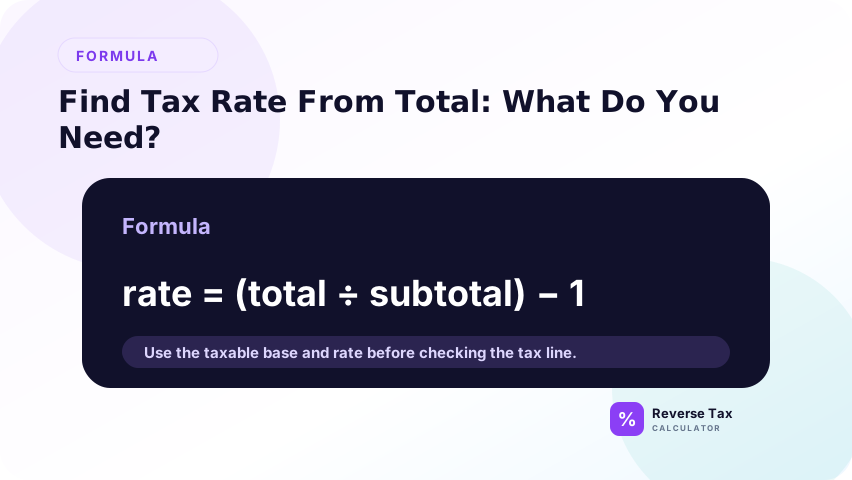
Tax rate = ((Total - Subtotal) / Subtotal) x 100
What Does Finding the Tax Rate Mean?
Finding the tax rate from total and subtotal means calculating the implied rate that connects the pre-tax subtotal to the final total. It is a diagnostic calculation, not always proof of the official rate. The formula can reveal whether a receipt roughly used 8%, 20%, or 5%, but rounding, mixed items, fees, discounts, and multiple taxes can distort the result.
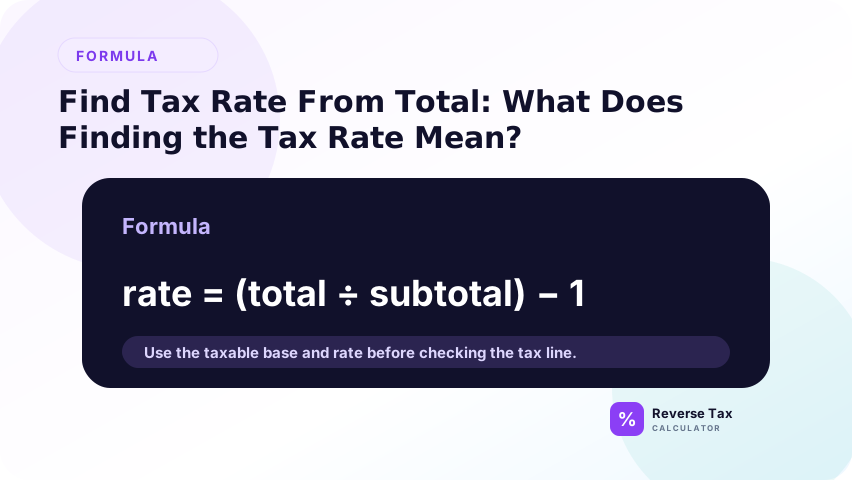
Finding the tax rate means calculating the implied percentage that connects a subtotal to a total.
This does not always prove the official legal rate. It only shows the rate implied by the numbers you entered.
What Do You Need?
You need the subtotal before tax and the total after tax.
| Input | Meaning |
|---|---|
| Subtotal | Amount before tax |
| Total | Amount after tax |
| Difference | Tax amount |
If the subtotal already includes tax, the formula will not work correctly.
Formula to Find Tax Rate
The formula is tax rate equals tax amount divided by subtotal. First subtract subtotal from total to find the tax amount. Then divide that tax amount by the subtotal. Multiply by 100 if you want a percentage display. This works best when the subtotal is the taxable base and the total includes only subtotal plus tax.

Use this formula:
Tax rate = ((Total - Subtotal) / Subtotal) x 100
Why Subtract Total and Subtotal First?
The difference between total and subtotal is the tax amount.
Why Divide by Subtotal?
The tax rate is based on the subtotal, not the total.
Why Multiply by 100?
Multiplying by 100 converts the decimal rate into a percentage.
Step-by-Step Example
A step-by-step example prevents the common mistake of dividing by the total. Start by finding the tax amount, then divide by the subtotal, then convert the decimal to a percentage. The subtotal matters because tax is calculated on the pre-tax amount, not on the final tax-inclusive total.
Use the steps as a field validation workflow. The total should be the amount after tax, the subtotal should be the taxable base before tax, and the difference should be tax. If any field includes payments, tips, shipping, discounts, exempt items, or fees, the implied rate may describe the receipt structure rather than the official rate.
Suppose the subtotal is 100.00 and the total is 108.00.
Step 1: Find the Tax Amount
Start by subtracting the subtotal from the total. The subtotal should represent the pre-tax taxable amount, and the total should represent the amount after tax was added. The difference between those two numbers is the tax amount shown or implied by the receipt. This step matters because the tax rate formula needs the tax amount as the numerator, not the full total.
108 - 100 = 8
The tax amount is 8.00.
If the total includes tips, delivery fees, payments, gift cards, or other non-tax items, clean those amounts before using this subtraction. Otherwise, the difference may include more than tax and the implied rate will be misleading.
Step 2: Divide Tax by Subtotal
Divide the tax amount by the subtotal because tax is calculated on the pre-tax base. This is the most important conceptual step. Do not divide tax by the total, because the total already includes tax. Dividing by the total gives the tax share of the gross amount, not the tax rate applied to the subtotal.
8 / 100 = 0.08
The result is a decimal rate. In this example, 0.08 means the tax amount is 8 percent of the subtotal. If the subtotal contains exempt items or multiple tax categories, the decimal may be a blended or distorted rate rather than one official rate.
Step 3: Convert to Percentage
Convert the decimal rate to a percentage by multiplying by 100. This makes the result easier to compare with rates shown on receipts, invoices, tax tables, or official rate lookup tools. The calculation result is an implied rate, which means it is inferred from the receipt fields. It should still be checked against the transaction location, date, and taxability when accuracy matters.
0.08 x 100 = 8
The implied tax rate is 8 percent.
Example with a Larger Invoice
A larger invoice example shows that the same implied-rate formula scales to business documents, but the evidence quality depends on invoice structure. If the invoice has taxable services, exempt products, shipping, discounts, and fees, the visible subtotal may not be the taxable base. Use line details before interpreting the implied rate as official.
Suppose an invoice subtotal is 1,000.00 and the total is 1,130.00.
Tax amount:
1,130.00 - 1,000.00 = 130.00
Rate:
130.00 / 1,000.00 x 100 = 13 percent
The implied rate is 13 percent.
Example with a Rounded Receipt
A rounded receipt can produce an odd implied rate even when the seller used a normal official rate. Tax may be rounded to cents, while the formula works from displayed subtotal and total. On small purchases, one cent can move the implied percentage noticeably. Treat weird decimals as prompts to check rounding, not automatic evidence of a wrong rate.
Suppose the subtotal is 93.46 and the total is 100.00.
Tax amount:
100.00 - 93.46 = 6.54
Implied rate:
6.54 / 93.46 x 100 = 6.9976 percent
This likely represents a 7 percent rate with rounding.
How to Check the Implied Rate
Use the implied rate to calculate forward.
| Check | Calculation | Result |
|---|---|---|
| Subtotal | 100.00 | 100.00 |
| Tax at 8 percent | 100 x 0.08 | 8.00 |
| Total | 100 + 8 | 108.00 |
If the check returns the original total, the rate is mathematically consistent.
When the Implied Rate May Not Match Official Rates
The implied rate may not match official rates when the receipt total contains more than one tax component, mixed taxable and exempt items, discounts, shipping, tips, fees, or rounding. It can also differ when the subtotal shown is not the taxable base. The implied rate is useful evidence, but it should be interpreted with receipt structure.
The implied rate may not match an official rate if the transaction includes rounding, discounts, fees, exempt items, multiple taxes, or an incorrect subtotal.
Rounding
A receipt may round tax to the nearest cent.
Discounts
Discounts may reduce the taxable subtotal.
Mixed Taxability
Some items may be taxable while others are exempt.
Multiple Taxes
The total may include state, local, provincial, federal, VAT, GST, PST, QST, or other components.
Wrong Subtotal
If the subtotal is not the taxable base, the implied rate will be misleading.
> Accuracy note: this formula finds an implied rate from the numbers provided. It does not verify the official rate. For source and calculation standards, see the methodology.
Implied Rate vs Official Tax Rate
An implied rate is calculated from the numbers on a receipt, invoice, or dataset. An official tax rate comes from a tax authority or official rate source.
They can match, but they are not the same kind of evidence.
| Rate type | Source | Use |
|---|---|---|
| Implied rate | Your subtotal and total | Check what rate the numbers suggest |
| Official rate | Tax authority or verified source | Confirm legal rate or expected rate |
| Combined rate | Multiple tax components | Explain total tax burden |
If the implied rate differs from the official rate, do not assume the official rate is wrong. Check rounding, fees, exemptions, discounts, and local components first.
How to Interpret Odd Implied Rates
Interpret odd implied rates by asking what the formula included in the numerator and denominator. If the rate is close to an official rate, rounding may explain it. If it is much higher, fees or extra tax components may be included. If it is lower, exempt items or discounts may be inside the subtotal. Odd rates are clues, not final answers.
Odd implied rates often appear when the numbers are not a clean single-rate transaction.
For example, an implied rate of 7.983 percent may be caused by rounding. An implied rate of 11.42 percent may be caused by multiple taxes, fees, or a subtotal that is not the taxable base.
One-Cent Differences
One-cent differences are common when tax is rounded at the line level.
If the subtotal is small, a one-cent difference can make the implied percentage look more unusual.
Why Small Subtotals Distort the Rate
A one-cent rounding difference is a larger share of a small subtotal than a large subtotal.
| Subtotal | One-cent difference as rate effect |
|---|---|
| 1.00 | 1.00 percent |
| 10.00 | 0.10 percent |
| 100.00 | 0.01 percent |
This is why tiny receipts can produce strange implied rates.
Multiple Tax Components
Some places use combined taxes. A total may include state and local sales tax, GST plus PST, or GST plus QST.
The implied rate may show the combined effect, not one individual rate.
Fees Included in Total
If the total includes delivery fees, service charges, or tips, the implied rate may be distorted.
Operational Table: Troubleshooting the Implied Rate
| Problem | Likely cause | What to check |
|---|---|---|
| Rate is close but not exact | Rounding | Line-item tax and total tax |
| Rate is much higher than expected | Fees or multiple taxes | Extra charges and tax lines |
| Rate is lower than expected | Exempt items or discounts | Taxable base |
| Rate is zero | No tax or zero-rated item | Tax line and item type |
| Rate is negative | Inputs reversed or credits | Total, subtotal, refunds |
This table is useful because the formula can reveal data problems, not just rates.
Decision Matrix: Should You Infer the Rate?
| Situation | Infer rate? | Better action |
|---|---|---|
| Subtotal and total are clear | Yes | Use formula |
| Total includes multiple tax lines | Maybe | Separate components |
| Receipt has exempt items | Be careful | Separate taxable base |
| You need legal rate | No | Use official source |
| You only know total | No | Need another value |
| You know total and rate | No | Use reverse tax |
What This Formula Can and Cannot Prove
| Can prove | Cannot prove |
|---|---|
| Implied rate from subtotal and total | Official legal rate |
| Whether numbers are internally consistent | Correct product taxability |
| Whether a rate is close to expected | Exemption validity |
| Possible rounding issue | Seller compliance |
An implied rate is evidence from the numbers, not a substitute for official rate verification.
Common Mistakes
Common mistakes include dividing by total instead of subtotal, using the wrong subtotal, treating an implied rate as an official rate, ignoring multiple tax components, using amount due after payments, and missing currency formatting. The safest workflow is to identify tax amount, taxable base, and source fields before calculating.
The correction is to treat the formula as an audit signal. Calculate the implied rate, compare it with the expected official rate, then explain any difference. A strange result can come from rounding, wrong subtotal, mixed taxability, multiple rates, or non-tax charges. Do not publish or post the implied rate as official without source verification.
Dividing by Total Instead of Subtotal
The tax rate is based on subtotal, not total.
Using the Wrong Subtotal
Use the taxable subtotal, not an after-tax total or amount due after payment.
Treating Implied Rate as Official Rate
The implied rate is a calculation result, not official tax guidance.
Ignoring Multiple Tax Components
Combined rates may hide several tax components.
Using Amount Due Instead of Total
Amount due may include payments, credits, or balances.
Use the transaction total, not the remaining amount after payments.
Ignoring Currency or Decimal Formatting
If subtotal or total is imported from a spreadsheet or POS system, decimal formatting can change the implied rate.
What This Page Does Not Cover
| Topic | Better page |
|---|---|
| Choosing official rate | How to Choose the Correct Tax Rate |
| Reverse tax formula | Reverse Tax Formula |
| Tax amount from total | How to Find the Tax Amount from a Total |
| Receipt rate | How to Find the Tax Rate on a Receipt |
Frequently Asked Questions
How do I calculate tax rate from total and subtotal?
Subtract subtotal from total, divide by subtotal, then multiply by 100.
Is the implied tax rate the official tax rate?
Not always. It is only the rate implied by the numbers.
Why is my implied rate a weird decimal?
Rounding, discounts, fees, mixed items, or multiple taxes may affect the calculation.
Can I use this for sales tax?
Yes, if subtotal and total are clear and one sales tax rate applies.
Can I use this formula for VAT or GST?
Yes, if the subtotal before VAT or GST and the total after VAT or GST are both known.
What if the tax rate comes out as 0 percent?
That usually means the total equals the subtotal. The transaction may be zero-rated, exempt, not taxed, or the tax may be missing from the data.