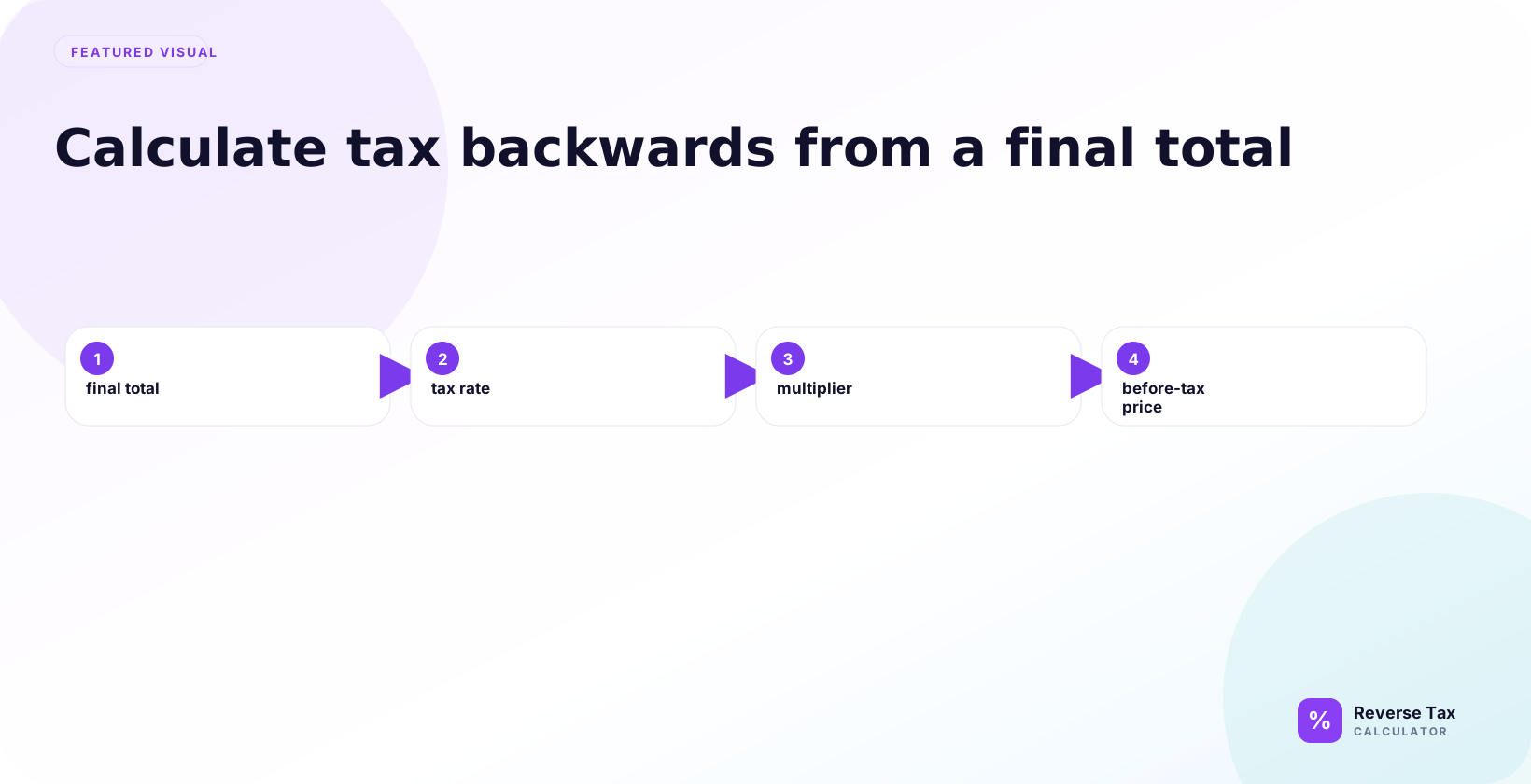
Calculating tax backwards means starting with a tax-inclusive total and dividing by one plus the tax rate to recover the price before tax. The tax included is the difference between the final total and that pre-tax price, so a 120 total at 20 percent becomes 100 before tax and 20 tax. The method assumes one taxable base and one rate; mixed receipts, exempt items, discounts, and rounded line items need separate calculations.
For example, if the total is 110.00 and the tax rate is 10 percent, divide 110.00 by 1.10. The pre-tax price is 100.00, and the included tax is 10.00.
What Does Calculating Tax Backwards Mean?
Calculating tax backwards means starting from a total that already includes tax and working back to the pre-tax amount and included tax. It is the opposite of adding tax to a subtotal. The calculation divides by 1 plus the rate because the total is the pre-tax price plus tax on that pre-tax price.

Calculating tax backwards means starting with a final amount that already includes tax and finding the amount before tax.
This is the opposite of adding tax. In a normal forward calculation, you start with the pre-tax price and add tax. In a backward calculation, you start with the final total and remove the included tax mathematically.
What Do You Need Before You Start?
You need two inputs: the tax-inclusive total and the tax rate.
| Input | Meaning | Example |
|---|---|---|
| Tax-inclusive total | Final amount after tax is included | 110.00 |
| Tax rate | Percentage applied to the pre-tax price | 10 percent |
If the total does not include tax, do not use a reverse calculation. If the rate is wrong, the result will be wrong.
How to Calculate Tax Backwards Step by Step
Calculate tax backwards by confirming the total includes tax, identifying the correct rate, dividing by 1 plus the rate to find the pre-tax amount, and subtracting that amount from the total to find included tax. If the receipt has multiple rates, exempt items, tips, shipping, or discounts, separate those lines first.

Use the steps as a practical receipt review. First ask whether the amount is a tax-inclusive sale total or another number such as balance due, payout, or card payment. Then confirm the rate and tax label. Then calculate. This sequence prevents the common error of applying the formula to a number that was never the taxable base.
The process has four steps.
Step 1: Confirm the Total Includes Tax
Confirm that the total already includes tax. Reverse calculation is only needed when the tax is inside the total. If the document shows a pre-tax subtotal and a separate tax line, use those values directly and use reverse tax only as a verification check.
Check that the number is a tax-inclusive total.
Look for labels such as total, total paid, amount due, price including tax, VAT included, GST included, or tax included.
Step 2: Convert the Tax Rate into a Multiplier
Convert the tax rate into a multiplier by changing the percentage to a decimal and adding 1. An 8 percent rate becomes 1.08. The multiplier represents the original price plus tax, which is why it is used as the divisor in the backward calculation.
Convert the percentage into a multiplier.
Use this structure:
1 + rate / 100
Examples:
| Rate | Multiplier |
|---|---|
| 5 percent | 1.05 |
| 8 percent | 1.08 |
| 10 percent | 1.10 |
| 20 percent | 1.20 |
Step 3: Divide the Total by the Multiplier
Divide the tax-inclusive total by the multiplier to find the pre-tax amount. This step reverses the forward tax calculation. If the total includes exempt items, tips, or multiple rates, separate those amounts before dividing.
The result is the base that tax was applied to. If that base looks unreasonable compared with the receipt lines, check whether the starting total was clean.
Divide the total by the multiplier.
This gives the pre-tax price.
Example:
110 / 1.10 = 100
Step 4: Subtract the Pre-Tax Price from the Total
Subtract the pre-tax amount from the total to find the included tax. This gives the tax portion inside the total and lets you check whether pre-tax amount plus tax returns to the original total after rounding.
This tax amount should be kept separate from the pre-tax amount in the output. Combining them again would recreate the gross total, not the tax split.
Subtract the pre-tax price from the total.
This gives the tax amount included in the total.
Example:
110 - 100 = 10
How to Calculate Sales Tax Backwards from Total
To calculate sales tax backwards from a total, use the combined sales tax rate that applied to the taxable base. Divide the total by 1 plus the rate to find the pre-tax sale, then subtract that pre-tax sale from the total to find tax. Do not use a state-only rate if local rates were included.
To calculate sales tax backwards from a total, use the same method.
Price before sales tax = Total after sales tax / (1 + sales tax rate / 100)
Then:
Sales tax included = Total after sales tax - Price before sales tax
The method works when one sales tax rate applies to the whole total.
How to Reverse Calculate Tax for VAT, GST, HST, PST, and QST
VAT, GST, HST, PST, and QST can all use reverse logic, but the correct rate and structure differ. VAT and GST prices may be tax-inclusive. HST uses a combined harmonized rate. GST plus PST or GST plus QST may require combined or separate treatment depending on the base. The label controls the formula path.
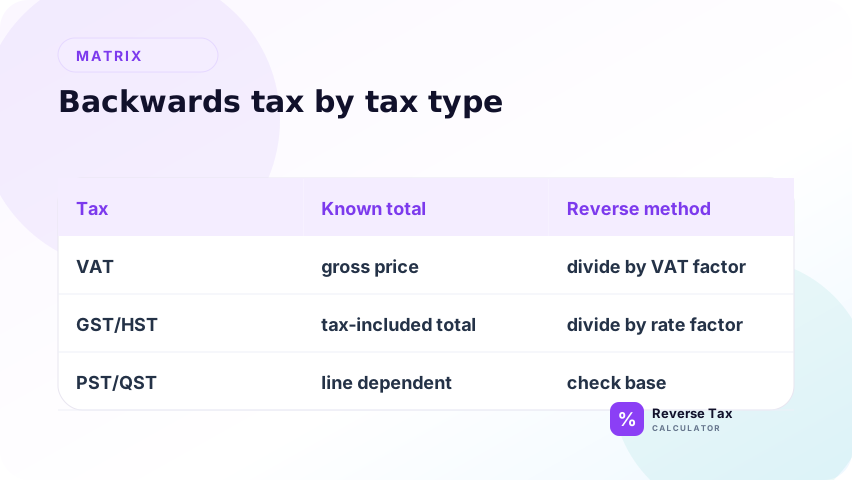
The same backward method can apply to VAT, GST, HST, PST, QST, and similar percentage-based taxes when the total includes tax and the correct rate is known.
The tax name changes, but the basic arithmetic stays the same for a simple single-rate total.
Reverse VAT Calculation
For VAT, start with the VAT-inclusive price and divide by the VAT multiplier.
If the VAT rate is 20 percent, the multiplier is 1.20.
Reverse GST or HST Calculation
For GST or HST, start with the GST-inclusive or HST-inclusive total and divide by the correct multiplier.
If the HST rate is 13 percent, the multiplier is 1.13.
Reverse PST or QST Calculation
For PST or QST, be careful because these taxes may appear alongside GST or other tax components.
If more than one tax applies, a single-rate reverse calculation may not be enough.
Sales Tax Backward Calculation Example
Suppose the total after sales tax is 216.00 and the sales tax rate is 8 percent.
| Step | Calculation | Result |
|---|---|---|
| Convert rate | 1 + 8 / 100 | 1.08 |
| Find pre-tax price | 216 / 1.08 | 200.00 |
| Find tax | 216 - 200 | 16.00 |
The price before sales tax is 200.00, and the included sales tax is 16.00.
How to Check Your Result
Check the result by calculating forward.
Start with the pre-tax price, add the tax, and see whether you return to the original total.
Using the example:
| Check | Amount |
|---|---|
| Pre-tax price | 200.00 |
| Add 8 percent tax | 16.00 |
| Total | 216.00 |
If the forward check returns to the original total, the backward calculation is internally consistent.
Operational Table: Manual Calculation vs Calculator vs Spreadsheet
Different methods fit different situations.
| Method | Best for | Limitation |
|---|---|---|
| Manual calculation | One simple total | Easy to make decimal mistakes |
| Reverse tax calculator | Quick one-off answer | Rate still must be correct |
| Spreadsheet formula | Many rows | Requires consistent data formatting |
| Receipt-specific workflow | Itemized receipts | Needs item and rate details |
| Accounting workflow | Gross deposits and records | Needs reconciliation support |
Use the method that matches the number of transactions and the level of detail needed.
Why You Should Not Subtract the Tax Rate
You should not subtract the tax rate because the rate is applied to the pre-tax amount, not the tax-inclusive total. At 8%, a total of 108.00 contains 8.00 tax, not 8.64. Dividing by 1.08 recovers 100.00, then subtracting gives the correct 8.00 tax portion.
Do not calculate tax backwards by subtracting the tax percentage from the total.
If the total is 110.00 and the rate is 10 percent, subtracting 10 percent from 110.00 gives 99.00. The correct pre-tax price is 100.00.
This mistake happens because the tax rate applies to the pre-tax amount, not the final total.
Backward Tax Calculation Decision Matrix
| Situation | Method |
|---|---|
| Total and rate known | Divide by tax multiplier |
| Total known but rate unknown | Find or infer rate first |
| Pre-tax price and rate known | Use forward tax, not backward tax |
| Multiple rates included | Use multiple-tax method |
| Receipt has exempt items | Separate taxable and exempt amounts |
| Result differs by one cent | Check rounding |
Common Problems When Calculating Tax Backwards
Common problems include using the wrong rate, reversing a balance due instead of sale total, ignoring mixed taxable and exempt items, using one rate for multiple taxes, and rounding too early. Treat the receipt as a set of entities first: taxable base, tax label, rate, tax amount, non-tax charges, and final total.
Another problem is assuming that every tax-inclusive total has one rate. Real receipts may contain standard-rated items, reduced-rate items, exempt items, taxable shipping, non-taxable tips, or refunds. When that happens, calculate backwards by group and then reconcile the groups to the total.
You Used the Wrong Rate
The formula only works with the correct rate.
If the transaction has local tax, reduced rates, exemptions, or multiple taxes, one rate may not be enough.
You Used a Subtotal Instead of Total
A subtotal before tax should not be reversed.
Use the tax-inclusive total when calculating backwards.
You Ignored Rounding
Receipts may round tax differently from your calculator.
A one-cent difference may be a rounding issue rather than a formula issue.
You Mixed Taxable and Exempt Items
If some items are not taxable, the whole total should not be treated as taxable at one rate.
You Used Tax-Inclusive and Tax-Exclusive Prices Together
Do not compare one tax-inclusive price with one tax-exclusive price unless you convert them to the same basis.
How to Calculate Tax Backwards in a Spreadsheet
Spreadsheet users can use the same structure.
If the total is in cell A2 and the tax rate is in cell B2 as a percentage, the pre-tax formula is:
=A2/(1+B2)
If the tax rate is entered as a whole number, such as 8 for 8 percent, use:
=A2/(1+B2/100)
The included tax formula is:
=A2-C2
where C2 contains the pre-tax result.
Spreadsheet Formatting Warning
Spreadsheet percentage formatting matters.
If a cell displays 8 percent, the spreadsheet may store it as 0.08. If you divide that by 100 again, the result will be wrong.
How to Choose the Right Backward Tax Method
Use this decision matrix when the situation is not a simple total.
| Question | If yes | If no |
|---|---|---|
| Does the total include tax? | Reverse tax may apply | Use forward tax if adding tax |
| Do you know the rate? | Use reverse formula | Find or infer rate first |
| Is there only one rate? | Use basic formula | Use multiple-tax formula |
| Are all items taxable? | Use total carefully | Separate taxable and exempt items |
| Is this for bookkeeping? | Keep records and reconcile | Calculator result may be enough |
Why Backward Tax Calculation Is Useful but Limited
Backward tax calculation is useful because it turns a final amount into a clearer breakdown.
It is limited because math cannot verify legal tax treatment. A clean calculation can still be based on the wrong rate, wrong taxable base, or wrong assumption about what the total includes.
This is especially important for business records, VAT/GST treatment, exemptions, and receipts with mixed items.
> Accuracy note: this page explains arithmetic steps. Tax rates, exemptions, and taxable bases must be verified separately. See the methodology for calculation standards.
What This Page Does Not Cover
| Topic | Better page |
|---|---|
| Formula-only explanation | Reverse Tax Formula |
| Price before tax only | How to Find the Price Before Tax |
| Tax amount from total | How to Find the Tax Amount from a Total |
| Formula proof | Why the Reverse Tax Formula Works |
| Worked examples hub | Reverse Tax Calculation Worked Examples |
Frequently Asked Questions
How do you calculate reverse tax?
Divide the tax-inclusive total by 1 plus the tax rate divided by 100. Then subtract the pre-tax amount from the total to find the tax.
How do you calculate sales tax backwards from total?
Use price before sales tax = total after sales tax / (1 + sales tax rate / 100).
Why do I divide by 1.10 for 10 percent tax?
Because 10 percent tax turns the pre-tax price into 110 percent of itself. The multiplier is 1.10.
Can I calculate tax backwards without the rate?
Not with the basic method. You need the tax rate, or you need a different calculation that infers the rate from total and pre-tax amount.
What if the receipt has more than one tax?
Use a multiple-tax method. One simple rate may not reverse the total correctly.